Invite tracking
How InviteCount credits each join to an inviter, how fake invites are detected, and how to label, import and clean up invite links.
Invite tracking is the core of InviteCount. When a member joins, the bot finds the invite they used and credits the member who created it. Every other growth feature (leaderboards, analytics, reports, join messages) reads these counts.
Invite tracking is free and always on. The settings below let you decide which joins count.
How a join is credited#
- The bot keeps the list of your server's invites and how many times each one was used.
- When a member joins, it compares the counters before and after. The invite whose counter went up is the one used.
- The creator of that invite gets one invite. If the join matches your fake invite rules, it counts as fake instead.
- When the invited member leaves, the invite moves to Leaves.
The bot needs Manage Server and Manage Channels to read invites. Without them, joins are not credited.
Join types#
Each join gets a type. The type picks which join message is sent, and how the join appears in analytics.
| Type | When |
|---|---|
| Normal | The member used an invite the bot could attribute. |
| Vanity | The member used the server's vanity link. Nobody is credited. |
| Bot | A bot was added through Discord's authorization page. Nobody is credited. |
| No permission | The bot could not read the invites (missing Manage Server or Manage Channels). |
| Unknown | The bot could not tell which invite was used (several joins at once, server widget, invite without creator, Discord error). |
Invite counters#
Each member has five counters, shown by /invites:
| Counter | Meaning |
|---|---|
| Total | The number used in leaderboards: Regular − Leaves − Fakes. |
| Regular | Everything the member brought: credited joins, leaves, fakes and bonus. |
| Leaves | Invited members who left the server. |
| Fakes | Joins that matched your fake invite rules. |
| Bonus | Invites added or removed by an administrator with /add invites and /remove invites. |
Administrators can change the counters with the management commands.
Fake invites#
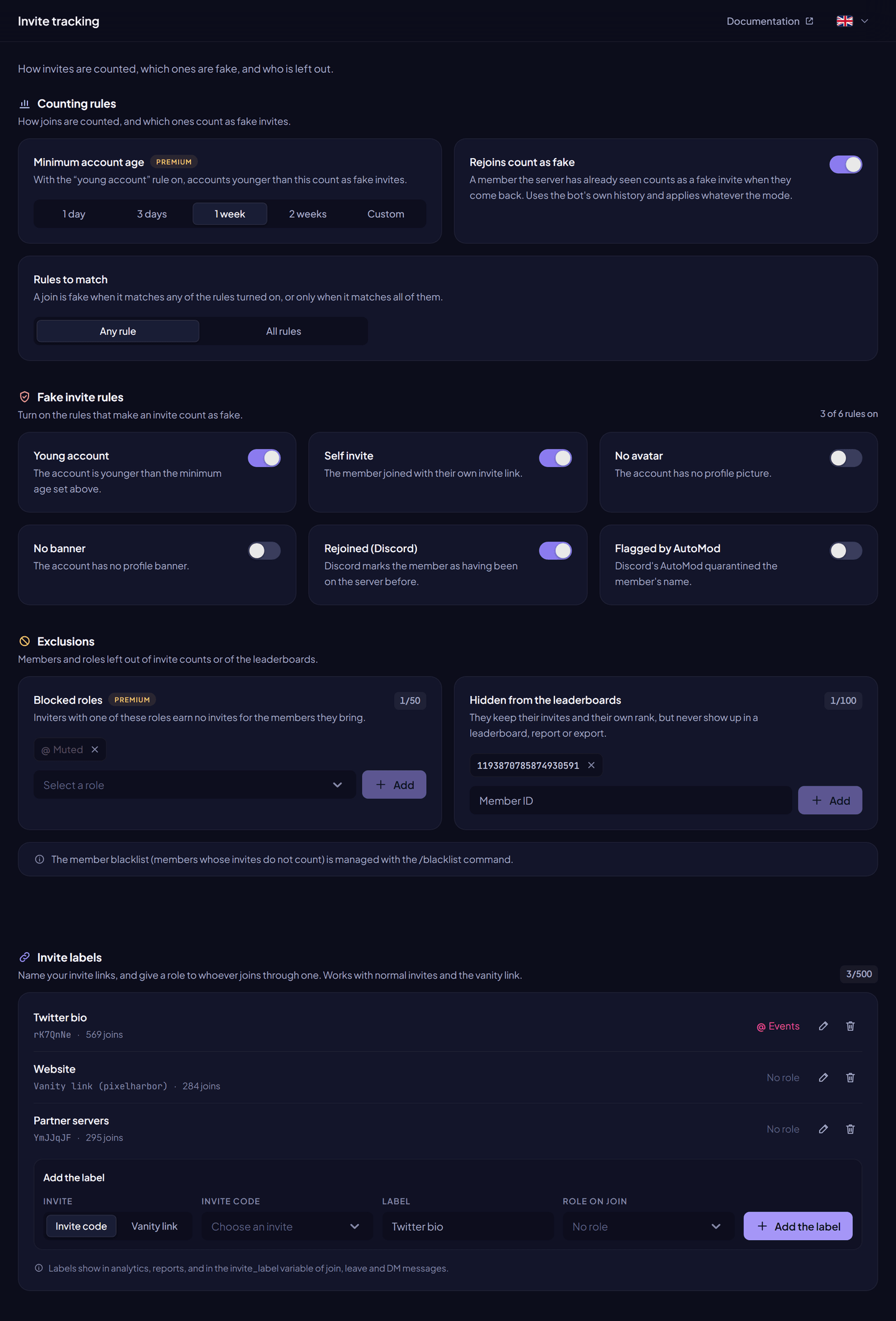
A fake invite is a join that matches the rules you turn on. It is counted in Fakes, not in the total.
Dashboard → Invite tracking → Fake invite rules. No rule is on by default: every join counts as a real invite.
| Rule | A join is fake when… | Free | Premium |
|---|---|---|---|
| Young account | The account is younger than the minimum account age. | ✓ | ✓ |
| Self invite | The member joined with their own invite link. | ✓ | ✓ |
| No avatar | The account has no profile picture. | ✓ | ✓ |
| No banner | The account has no profile banner. | ✓ | ✓ |
| Rejoined (Discord) | Discord marks the member as having been on the server before. | ✓ | ✓ |
| Flagged by AutoMod | Discord's AutoMod quarantined the member's name. | ✓ | ✓ |
Counting rules#
| Setting | What it does | Free | Premium |
|---|---|---|---|
| Rules to match | Any rule: a join is fake when it matches one of the rules turned on. All rules: only when it matches all of them. | ✓ | ✓ |
| Minimum account age | The age used by the Young account rule: 1 day, 3 days, 1 week, 2 weeks, or a custom value from 0 to 365 days. Also with /fakedelay. | 3 days, fixed | Your choice |
| Rejoins count as fake | A member the server has already seen counts as fake when they come back. It uses the bot's own join history, and applies whatever the mode. | ✓ | ✓ |
Exclusions#
| Setting | What it does | Free | Premium |
|---|---|---|---|
| Member blacklist | Members whose invites are not counted. Managed with /blacklist. | 3 members | 100 members |
| Blocked roles | Inviters with one of these roles earn no invites for the members they bring. | — | 50 roles |
| Hidden from the leaderboards | Members who keep their invites but never appear in a leaderboard, report or export. | 3 members | 100 members |
See Blacklist and hidden members.
Invite labels#
A label gives a name to an invite link, for example Twitter bio or Partner server. It can also give a role to every member who joins through that link, on top of the auto roles.
Labels work with normal invite codes and with the vanity link. They appear in analytics (top invite links), in server reports, and in the {invite_label} variable of join, leave and DM messages.
Add a label from the dashboard:
- Dashboard → Invite tracking → Invite labels.
- Choose Invite code and pick an invite, or choose Vanity link.
- Type the label (1 to 64 characters).
- Optional: choose a Role on join.
- Click Save the label.
With a command: /label set code:<code, link or vanity> name:<label> [role].
| Free | Premium | |
|---|---|---|
| Labelled links | 1 | 500 |
Removing a label keeps the invite working. Only its name and its role are removed.
Who invited whom#
| Command | What it shows | Plan |
|---|---|---|
/invites [member] | The five counters of a member. | Free |
/inviter [member] | Who invited a member. | Premium |
/invitedby [member] [code] [label] [role] | Members still on the server who were invited by a member, joined through a code or a label, or were invited by members with a role. One filter at a time. | Premium |
/invitedwith <link> | Members who joined through an invite code, vanity, or a label. | Premium |
/trace <member> | The chain of inviters above a member. | Free: once a day per server. Premium: unlimited. |
/invitecodes [member] | A member's invite codes, newest first, with their labels. Administrators only. | Free |
/search <min> <max> [invites_type] | Members whose invites, fakes, bonus or leaves are within a range. | Free |
/userinfo also shows who invited the member on premium servers.
Personal invite link#
/findlink gives a member their own invite link for the server. The bot reuses their personal link or one of their permanent invites. If they have none, it creates a permanent invite credited to them. Set mobile:True to receive the bare link, easier to copy on a phone.
The bot needs Create Invite to create the link (Administrator covers it).
Import existing invite counts#
When the bot joins a server, invites created before it keep their Discord use counters, but the bot doesn't know who joined with them. /syncinvites imports these counters into the creators' invites.
- Run
/syncinvitesfor the whole server, or/syncinvites member:@someonefor one member. You need Administrator. - The bot asks for a confirmation first.
- Uses already counted by the bot, and uses imported before, are never added twice. You can run it again safely.
- Bonus, fakes and leaves are kept.
Clean up invite codes#
| Command | What it does | Permission |
|---|---|---|
/deleteinvite <invite_code> | Deletes one invite. | Manage Channels |
/purge-invite-codes [count] [max_uses] [include_members] [exclude_members] [include_channels] [exclude_channels] | Deletes many invites at once, least used and oldest first. Member and channel filters take mentions or IDs. Shows how many codes and uses are affected before confirming. Up to 1,000 codes. | Manage Server |
Deleting an invite doesn't change the invites already credited.
Commands#
| Command | Permission | Plan |
|---|---|---|
/invites, /search, /trace, /findlink | Everyone | Free (/trace limited to once a day) |
/inviter, /invitedby, /invitedwith | Everyone | Premium |
/invitecodes, /syncinvites | Administrator | Free |
/fakedelay <days_amount> | Administrator | Premium |
/countingrules view, rejoins, hide, unhide, unblockrole | Manage Server | Free |
/countingrules blockrole | Manage Server | Premium |
/label set, remove, list | Manage Server | Free (1 label) |
/deleteinvite | Manage Channels | Free |
/purge-invite-codes | Manage Server | Free |
Full details: Invite commands.
Permissions#
| Bot permission | Why |
|---|---|
| Manage Server | Read the server's invites. |
| Manage Channels | See invites being created and deleted, delete invites. |
| Manage Roles | Give the role of a label. |
| Create Invite | Create personal links with /findlink. |
FAQ#
Why does a member have fewer invites than the uses of their link?
Uses from before the bot joined are not counted until you run /syncinvites. Members who left are counted in Leaves, and joins that matched a rule in Fakes.
What happens to the settings when Premium ends?
The minimum account age goes back to 3 days, blocked roles stop applying, and only the oldest label and the first 3 hidden or blacklisted members take effect. Everything stays saved and comes back with Premium.
Can I count only members who stay a while?
Use the Leaves counter: when an invited member leaves, their invite moves out of the total. Combine it with the Young account rule to ignore new accounts.