Raid protection
Detect join raids as they start, alert your staff and answer them in one click or automatically.
A raid is a wave of accounts, often new, joining at the same time. Raid protection spots it, opens an incident, alerts your staff and helps you answer it.
Detection, the alert and the invite pause are free. Custom thresholds, the automatic response, the other buttons and the lockdown need Premium.
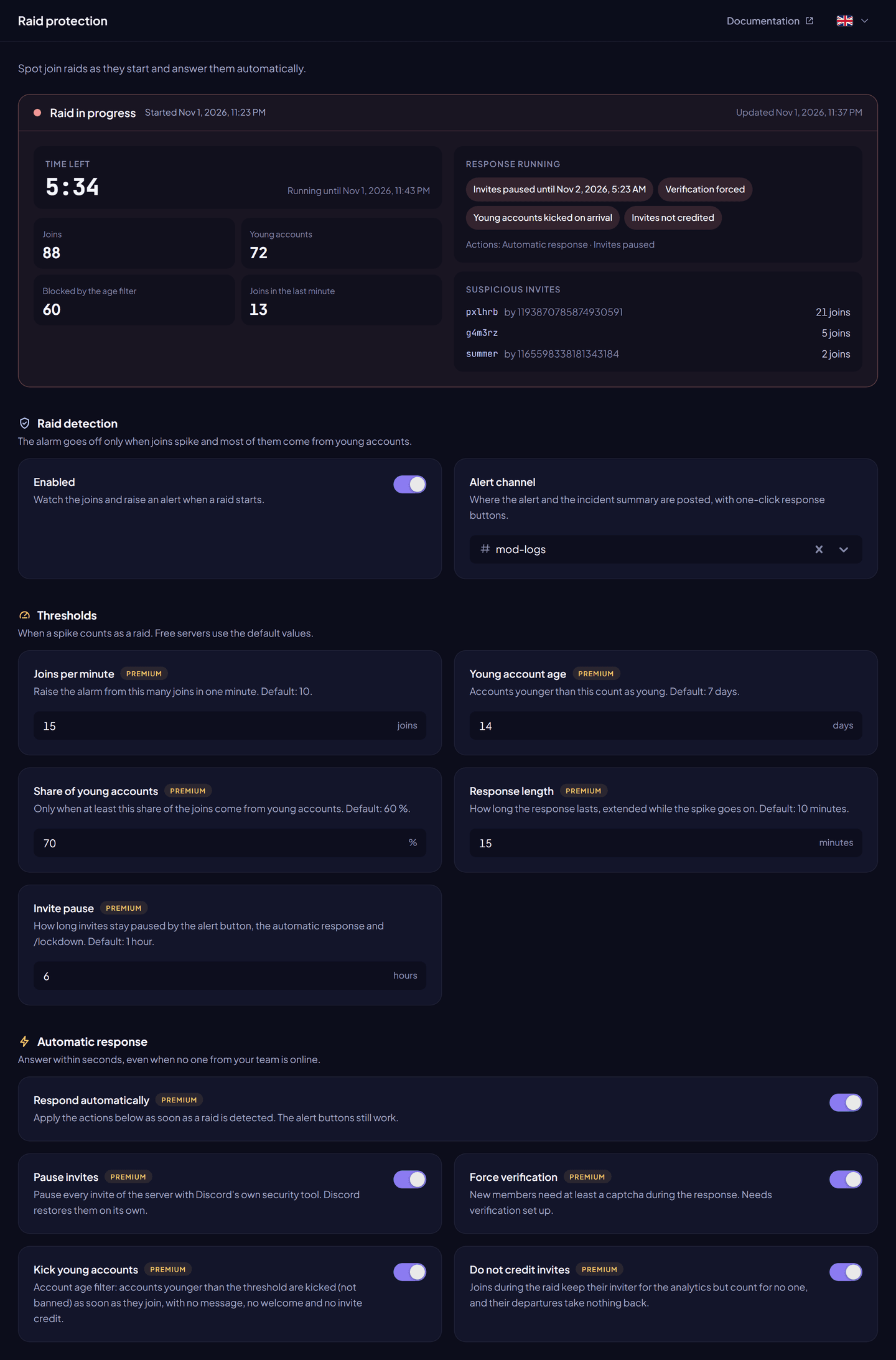
Turn it on#
- Dashboard → Raid protection.
- Turn on Raid detection and choose the Alert channel.
- Click Save changes.
Raid protection is off by default.
How a raid is detected#
A raid starts when, within one minute, at least a number of members join (joins per minute) and a share of them (share of young accounts) have accounts younger than the young account age. Five young accounts joining within 10 seconds start an incident at once.
When an incident starts, the bot posts an alert in the alert channel: number of joins, young accounts, and the suspicious invites (code, creator and joins). The response lasts the response length, and is extended while the spike goes on. When it ends, the bot posts a summary: duration, joins, young accounts, joins blocked, peak per minute and invites used.
Settings#
| Setting | What it does | Free | Premium |
|---|---|---|---|
| Raid detection | Turns detection on or off. | ✓ | ✓ |
| Alert channel | Where alerts and summaries are posted. | ✓ | ✓ |
| Joins per minute | Joins needed in one minute (3 to 100). | 10 | Your choice |
| Young account age | Accounts younger than this are young (1 to 90 days). | 7 days | Your choice |
| Share of young accounts | Share of young accounts needed (10 to 100 %). | 60 % | Your choice |
| Response length | How long the response lasts (1 to 60 minutes). | 10 min | Your choice |
| Invite pause | How long invites stay paused (1 to 24 hours). | 1 hour | Up to 24 hours |
Automatic response (Premium)#
With Respond automatically on, the bot acts as soon as a raid starts:
| Action | What it does |
|---|---|
| Pause invites | Pauses the server's invites with Discord's security action, for the invite pause. Discord restores them on its own. On by default. |
| Force verification | Requires at least a captcha during the response (needs verification set up). |
| Kick young accounts | Kicks accounts younger than the young account age as soon as they join. They get no message, and their join is not counted. |
| Do not credit invites | Joins during the raid credit no one. On by default. |
Alert buttons#
| Button | What it does | Plan |
|---|---|---|
| Pause invites | Pauses invites (1 hour on free servers). | Free |
| False alarm | Ends the incident and restores invites. | Free |
| Strengthen verification | Forces at least a captcha (needs verification set up). | Premium |
| Kick young accounts | Kicks the young accounts of the raid. | Premium |
| Ban the raid | Bans the members of the raid, after a confirmation that shows how many young and older accounts are affected. | Premium |
The summary also has a Ban the cohort button on premium servers. The owner, the bot and members who can manage the server are never banned. The member pressing a button needs Manage Server, Kick Members or Ban Members.
Lockdown (Premium)#
A lockdown starts the defences by hand: invites paused, invite credit held, verification forced (when set up), young accounts kicked (when Kick young accounts is on).
- Dashboard → Raid protection → Lockdown: choose the length and click Start the lockdown, or End now.
/lockdown start [minutes](5 to 120, default 30) and/lockdown end. You need Administrator.
Mass ban (Premium)#
/massban inviter:<member> or /massban code:<code> bans every member still on the server who joined through that member's invites or that code. The confirmation shows how many members, and how many accounts are younger than 7 days. Staff, the owner and the bot are never banned. You need Ban Members.
Incident history#
The dashboard lists past raids and lockdowns, with their joins, peak, blocked joins, invites and every action taken (by whom, or automatic).
| Free | Premium | |
|---|---|---|
| Incidents kept | 3 days | No limit |
Permissions#
Manage Server (pause invites), Kick Members and Ban Members, and Send Messages and Embed Links in the alert channel.