Leaderboards
Rank members by invites or messages, over all time or a period, in Discord, in pinned messages, on the web and in CSV files.
InviteCount ranks your members by invites or messages. You can show a leaderboard with a command, pin one that updates itself, publish it on the web, or export it.

Show a leaderboard#
/leaderboard invites or /leaderboard messages, with these options:
| Option | Values | Free | Premium |
|---|---|---|---|
period | all (default), day, week, month | All time, today, this week | Also this month |
role | Only members with this role | — | ✓ |
page | Page number | ✓ | ✓ |
Periods are calendar days in UTC, today included: day is today, week the last 7 days, month the last 30 days. Over a period, a member's count is the credited joins of that period whose member is still on the server (or the messages sent in that period).
Other rankings, all time only: /leaderboard bonus, /leaderboard fakes, /leaderboard left, /leaderboard regular.
The dashboard's Leaderboard page shows the same rankings, with each member's last invited member and retention (the share of their invited members still on the server). Members can also open the members' web page of the leaderboard, after logging in with Discord.
Hidden members are left out of every leaderboard. See Hidden members.
Pinned leaderboards (Premium)#
A pinned leaderboard is a message the bot posts in a channel, pins, and updates every 15 minutes.
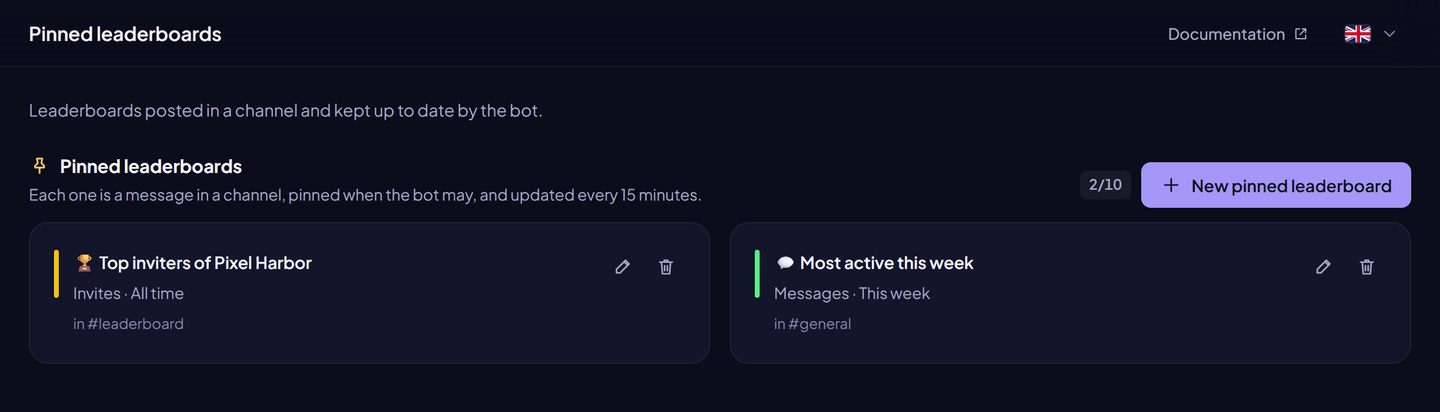
From the dashboard:
- Dashboard → Pinned leaderboards → New pinned leaderboard.
- Choose the Channel, the Leaderboard (invites or messages) and the Period.
- Optional: title, description, Members only (leave out members who left), colour, thumbnail, image, footer and author.
- Click Post the leaderboard. It is posted at once.
With a command: /leaderboard pin create [channel] [title] [description] [only_members] [kind] [period].
| Setting | Limit |
|---|---|
| Pinned leaderboards per server | 10 (Premium only) |
| Title | 256 characters (empty: automatic title) |
| Description | 500 characters |
| Footer text | 2,048 characters |
Editing a pinned leaderboard updates its message at once. Deleting it stops the updates; the message stays in the channel. If someone deletes the message, the bot forgets that leaderboard.
Public web leaderboard (free; custom link Premium)#
Every server's leaderboard is on a web page that anyone can read without logging in, at https://invite-count.xyz/leaderboard/<server ID>. It is free and on by default; the View Online button of leaderboard messages opens it. Premium only adds a custom link, such as https://invite-count.xyz/leaderboard/<your-link>, which opens the same page.
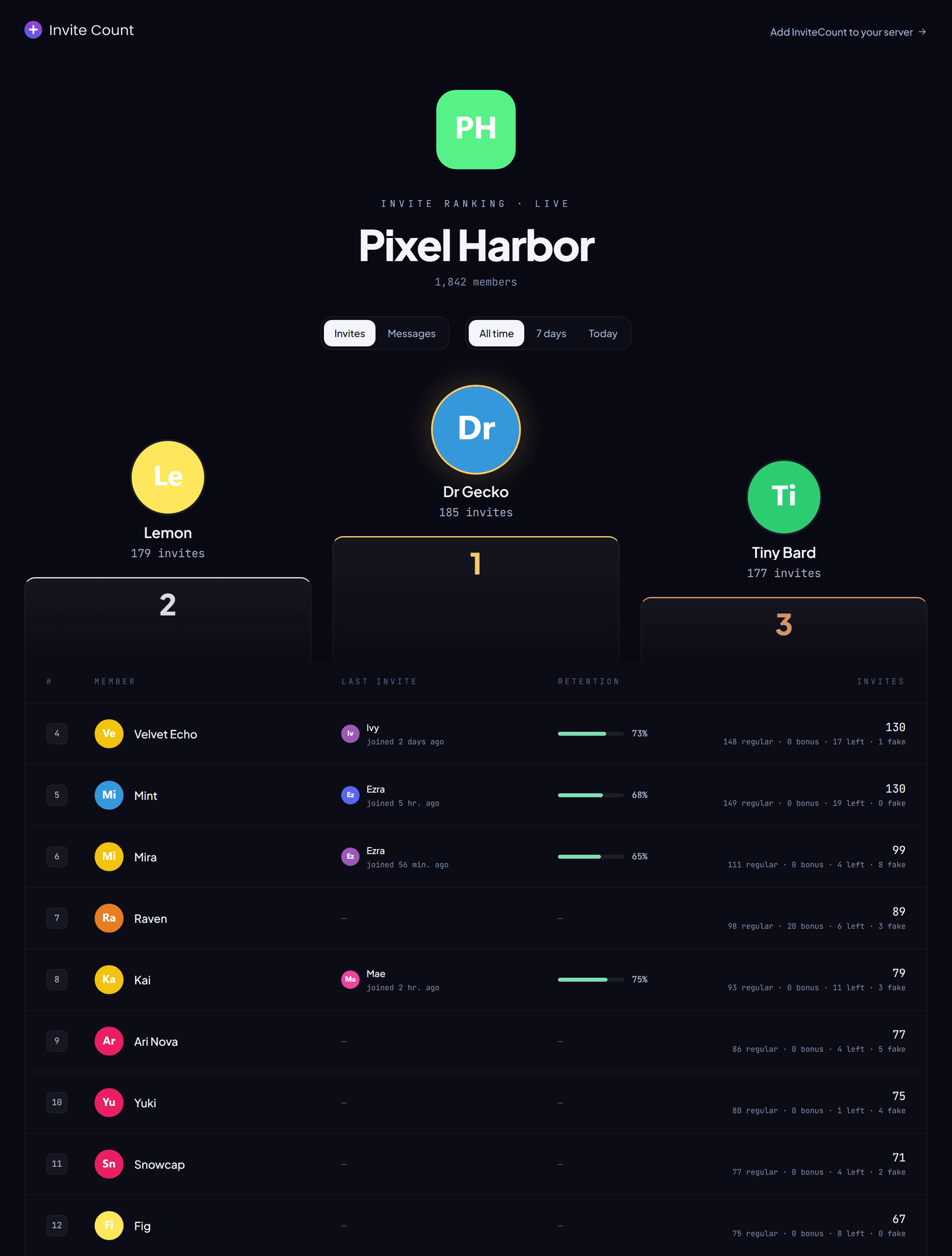
From the dashboard:
- Dashboard → Leaderboard → Public leaderboard.
- Show the leaderboard on the web is on by default: turn it off to take the page down (nothing about your members is shown any more).
- Optional: Show invite details (regular, bonus, left and fake invites, retention, last invited member).
- Premium: choose a Custom link: 3 to 32 lowercase letters, digits or dashes, not only digits. Links are unique and first come, first served.
- Click Save changes, then Copy the link.
With a command: /leaderboard publish [link] [show_details] puts the page back on the web (the link option is Premium) and /leaderboard unpublish takes it off.
What the page shows: the server's name, icon and member count, and for each member their display name, avatar and count. It never shows user IDs or usernames. Hidden members are left out, and members who left appear as Former member. Visitors can switch between invites, messages and levels (on servers that use levels) and between periods (this month on Premium servers).
Export a leaderboard (Premium)#
/export leaderboard [kind] [period] sends a CSV file: rank, member ID and counters. Up to 50,000 rows for a period. One leaderboard export every 5 minutes per server. Hidden members are left out.
/export csv (free) exports the raw invite counters of every member: member ID, invites, fakes, bonus, leaves.
Free and Premium#
| Feature | Free | Premium |
|---|---|---|
| Leaderboards of all time, today and this week | ✓ | ✓ |
| Leaderboard of the month, filter by role | — | ✓ |
| Pinned leaderboards | — | 10 |
| Public web leaderboard | ✓ | ✓ |
| A custom link for your public leaderboard | — | ✓ |
| CSV export of leaderboards | — | ✓ |
/export csv of raw counters | ✓ | ✓ |
Commands#
| Command | Permission | Plan |
|---|---|---|
/leaderboard invites, messages, bonus, fakes, left, regular | Everyone | Free (month and role: Premium) |
/leaderboard publish | Manage Server | Free (custom link: Premium) |
/leaderboard unpublish | Manage Server | Free |
/leaderboard pin create, pin update | Administrator | Premium |
/leaderboard pin list, pin delete | Administrator | Free |
/export leaderboard | Administrator | Premium |
/export csv | Administrator | Free |
Full details: Leaderboard and stats commands.
Permissions#
Pinned leaderboards need View Channel, Send Messages, Embed Links and Read Message History in the channel, and Pin Messages to pin them.