Levelling
Members earn XP by chatting, level up, and get a rank card designed by you.
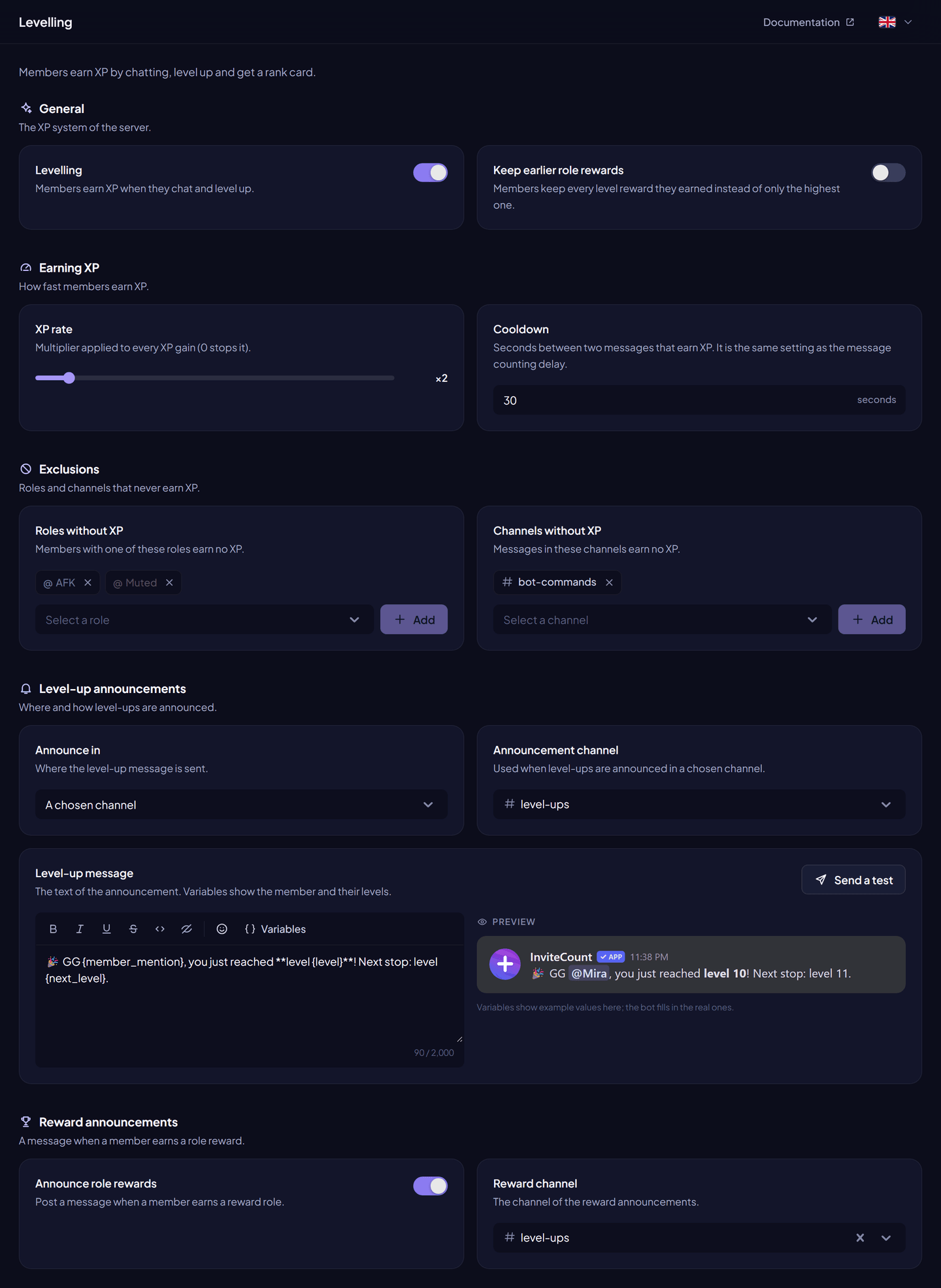
With levelling on, members earn XP when they chat. When they have enough XP, they level up and the bot can announce it. /level shows their level card.
Levelling is free. The card editor has free and premium limits.
Turn it on#
Dashboard → Levelling → turn on Levelling → Save changes. Or /leveling on.
How XP works#
- Each counted message gives 2 to 5 XP, multiplied by the XP rate.
- A member earns XP at most once per cooldown.
- Going from level n to level n + 1 takes
10 × n² + 50 × n + 100XP. Level 1 → 2 takes 160 XP, level 10 → 11 takes 1,600 XP.
Settings#
| Setting | What it does | Free | Premium |
|---|---|---|---|
| Levelling | Turns XP and levels on or off. | ✓ | ✓ |
| XP rate | Multiplier applied to every XP gain, from 0 to 25. 0 stops XP. | ✓ | ✓ |
| Cooldown | Seconds between two messages that earn XP (1 to 500). Same setting as the message counting delay. | ✓ | ✓ |
| Roles without XP | Members with one of these roles earn no XP. | ✓ | ✓ |
| Channels without XP | Messages in these channels earn no XP. | ✓ | ✓ |
| Announce in | Where level-ups are announced: the channel of the message, a chosen channel, a private message, or nowhere. | ✓ | ✓ |
| Announcement channel | Used with a chosen channel. | ✓ | ✓ |
| Level-up message | The text of the announcement, with level-up variables. Default: GG {member}, you have just reached {level} lvl! | ✓ | ✓ |
| Level card | The image /level sends, designed in the card editor. | Free limits | Premium limits |
Send a test sends the level-up message, and Send a test card the level card, with you as the member.
Commands#
| Command | What it does | Permission |
|---|---|---|
/level [member] | Sends the level card. Also from a member's Apps → Level menu. | Everyone |
/leveling on, /leveling off | Turns levelling on or off. | Administrator |
/leveling text <text> | Sets the level-up message. | Administrator |
/leveling channel [channel] | Sets the announcement channel. Without a channel, the channel of the message is used. | Administrator |
/add xp, /reset xp, /reset all xp | Changes XP. | Administrator |
Permissions#
Send Messages, Embed Links and Attach Files (level card) in the channels where the bot answers or announces.