Message counting
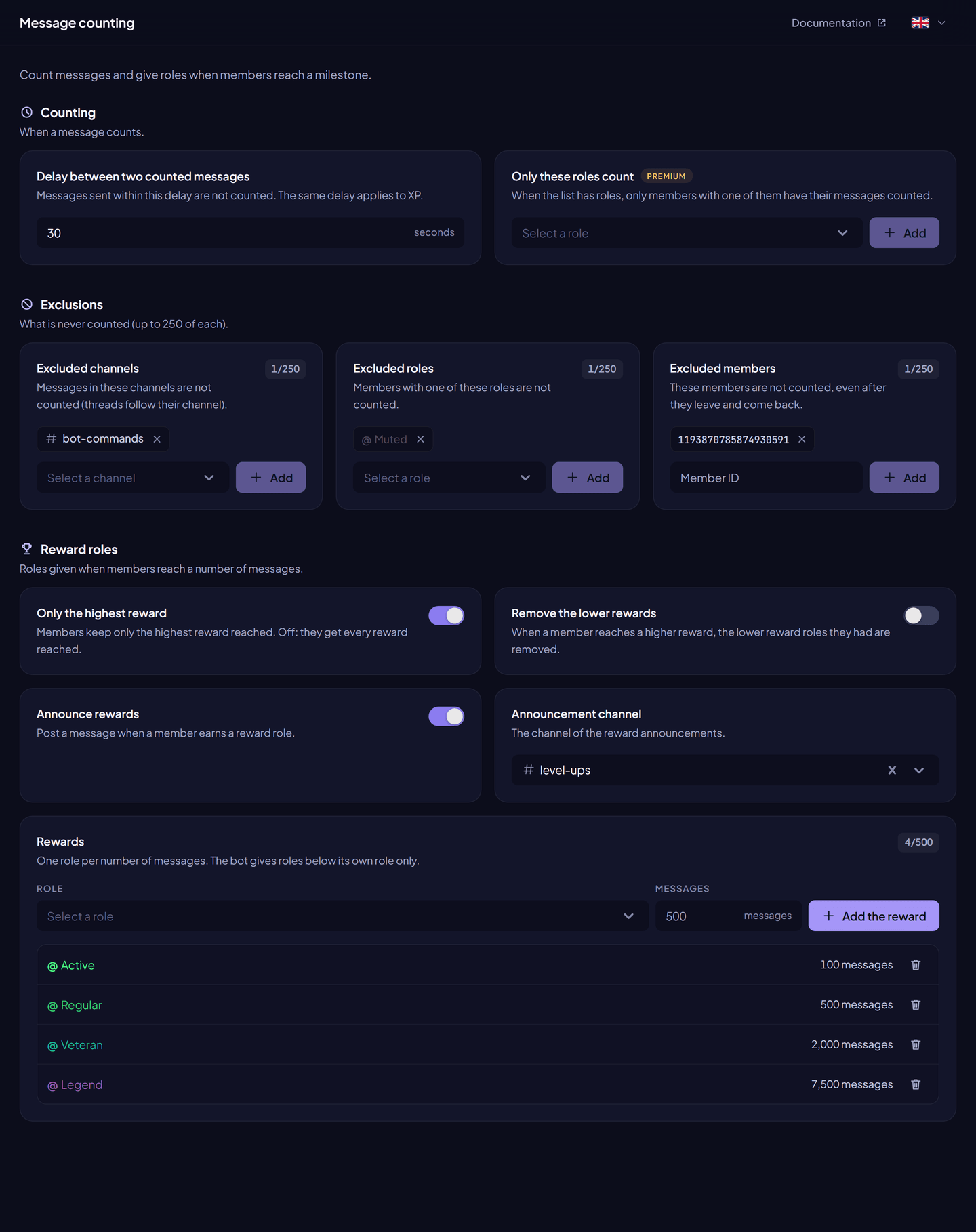
Count members' messages, leave channels or roles out, and give roles at message milestones.
InviteCount counts the messages each member sends. Counts feed the messages leaderboard and the reward roles: roles given when a member reaches a number of messages.
Message counting is always on and free. Only the role whitelist needs Premium.
When a message counts#
A message counts when:
- it is not sent within the delay after the member's previous counted message;
- it is not in an excluded channel (a thread follows its parent channel);
- its author is not an excluded member and has no excluded role;
- on a premium server with a whitelist, its author has one of the whitelisted roles.
The bot only counts messages. It doesn't read or keep what they say.
Settings#
| Setting | What it does | Free | Premium |
|---|---|---|---|
| Delay between two counted messages | Messages sent within this delay are not counted (1 to 500 seconds). The same delay applies to XP. | ✓ | ✓ |
| Excluded channels | Messages in these channels are not counted. | 250 | 250 |
| Excluded roles | Members with one of these roles are not counted. | 250 | 250 |
| Excluded members | These members are not counted, even after they leave and come back (member IDs). | 250 | 250 |
| Only these roles count | When the list has roles, only members with one of them are counted. | — | Unlimited |
Reward roles#
| Setting | What it does | Free | Premium |
|---|---|---|---|
| Rewards | One role per number of messages. | 10 | 500 |
| Only the highest reward | On: members keep only the highest reward reached. Off: they get every reward reached. | ✓ | ✓ |
| Remove the lower rewards | When a member reaches a higher reward, the lower reward roles they had are removed. | ✓ | ✓ |
| Announce rewards | Posts a message in the Announcement channel when a member earns a reward role. | ✓ | ✓ |
Add a reward: pick a Role, type the number of Messages, click Add the reward, then Save changes. Or use /rank add role:@role messages_need:<number>.
The bot gives roles below its own role only. Roles with moderation or administrator permissions are refused.
Commands#
| Command | What it does | Permission |
|---|---|---|
/messages [member] | Shows a member's messages and the next reward. | Everyone |
/leaderboard messages | The messages leaderboard. | Everyone |
/rank add, /rank remove, /rank list | Manage reward roles. | Administrator |
/add messages, /remove messages, /set messages | Change a member's count (reward roles follow). | Administrator |
/reset messages, /reset all messages, /delete messages, /delete all messages, /delete departed kind:messages | Reset or delete counts. | Administrator |
See Message and level commands and Management commands.
Permissions#
Manage Roles for reward roles, with the bot's role above them. Send Messages and Embed Links in the announcement channel.