Activate Premium
Subscribe on Patreon, link Discord, and activate Premium on your servers.
1. Subscribe on Patreon#
Open invite-count.xyz/premium and pick the plan that matches the number of servers you want to upgrade. You subscribe on Patreon.
2. Link your Discord account in Patreon#
In your Patreon settings, open Connected apps and connect the Discord account you use on your server. This is how InviteCount knows that the subscription is yours.
The bot reads the Patreon subscriptions every 5 minutes. Your Premium appears within 5 minutes of subscribing and linking Discord.
3. Activate your servers#
You can activate Premium on servers where you have Manage Server and where InviteCount is present.
- Open the dashboard and go to My premium (in the Account group).
- Check your subscription: status, plan and servers used.
- Under Your servers, click Upgrade next to a server.
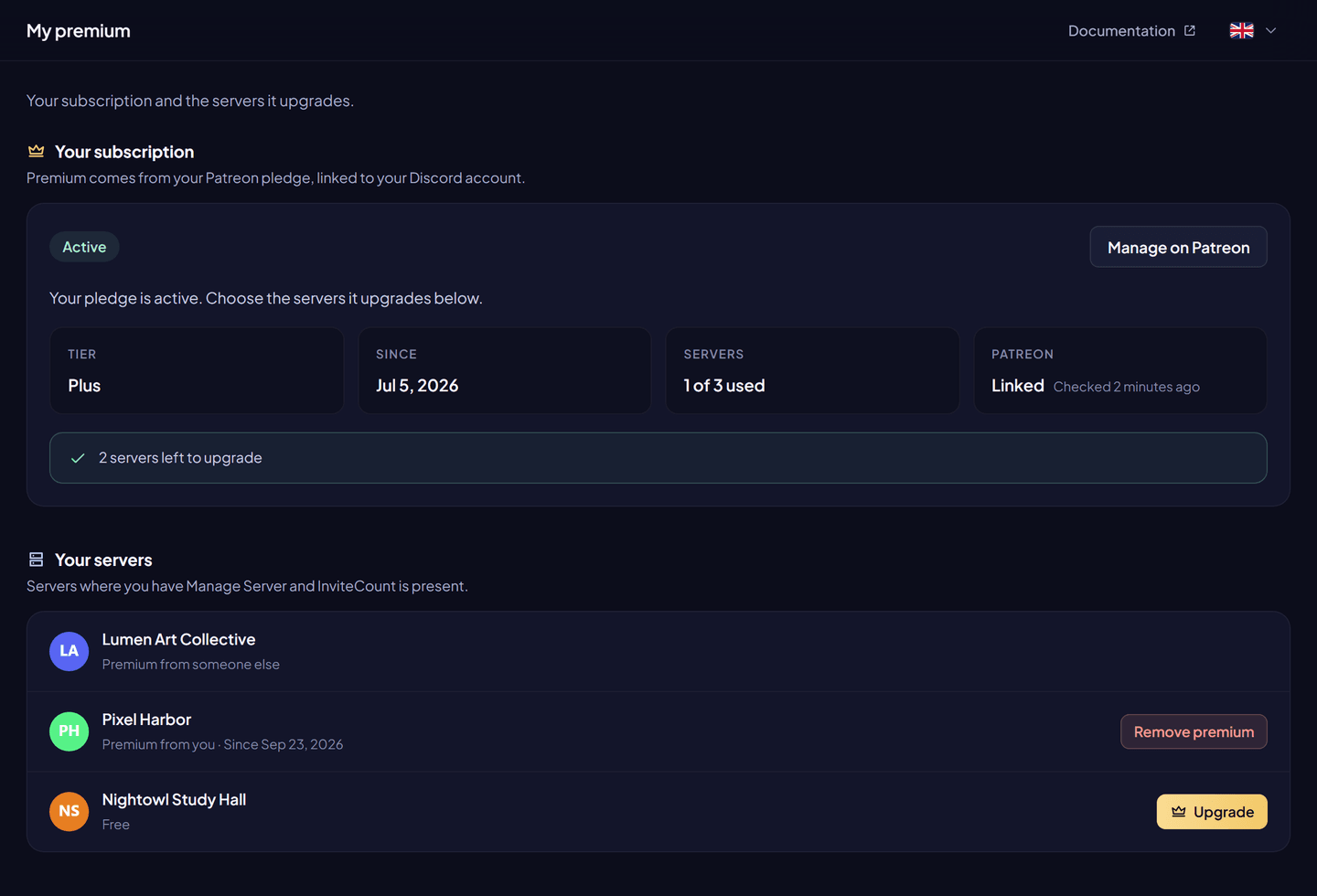
Run /premium add in the server to upgrade, or /premium add guild:<server ID> from anywhere. /premium guilds lists your upgraded servers.
Premium applies at once. A server has Premium from one member at a time.
Move Premium to another server#
- Remove it from the current server: Remove premium on My premium, or
/premium remove. - Activate it on the new server.
Only the member who activated a server can remove its Premium. Removing works even if the bot already left that server.
Change plan#
Change your tier on Patreon. The bot picks up the new number of servers within 5 minutes. If the new plan has fewer servers, see When Premium ends.
Subscription statuses#
My premium shows where your subscription stands:
| Status | Meaning | What to do |
|---|---|---|
| Active | Your pledge is active. | Choose the servers to upgrade. |
| Given by the team | The InviteCount team gave you Premium. | Choose the servers to upgrade. |
| Being activated | Patreon says your pledge is active; the bot stores it within 5 minutes. | Come back in a moment. |
| Ended | Your Patreon pledge is no longer active. | Renew it on Patreon. |
| No subscription | No pledge is linked to this Discord account. | Subscribe, or link your Discord account in Patreon. |
Premium given by the team is never changed by Patreon.
Troubleshooting#
| Message | Fix |
|---|---|
| You do not have a premium plan | Link the right Discord account in Patreon, then wait up to 5 minutes. |
| Every server of your plan is used | Remove Premium from a server first, or move to a bigger plan. |
| This server already has premium | Someone (maybe you) already activated it. |
| You need the Manage Server permission on this server | Ask for the permission, or let a server manager activate their own Premium. |
| InviteCount is not on this server anymore | Add the bot back first. |